Last updated: March 25, 2026
I can now write a Facebook post with one sentence and get the draft plus image five minutes later
I built myself a Facebook-post Skill. It is not just a prompt, but a full workflow with scripts, style memory, and image generation.
TL;DR
Key takeaways first
>A useful AI skill is not just a prompt. It is a workflow with templates, style memory, scripts, and output constraints.
>If a task has repeated inputs, stable judgment rules, and a clear output format, it is a good skill candidate.
>This article is about turning repeated work into an asset, not about showing off automation for its own sake.
I can now write a Facebook post with one sentence and get the draft plus image five minutes later
This post is less about which model is strongest and more about how tools start doing real work for you.
After writing about Claude Cowork and the big three AI coding tools, a lot of people asked me the same question: "So what are you actually using these tools for?" This is my answer.
1. A Skill is not just a document
Many people think a Skill is just a markdown instruction file telling the AI what to do. It is more than that.
A Skill is closer to a whole folder that can contain scripts, templates, config files, example data, and sometimes even a memory layer. Put more bluntly:
- a prompt is one instruction
- a Skill is an SOP manual plus a toolbox
Those are very different things.
2. What I built for myself
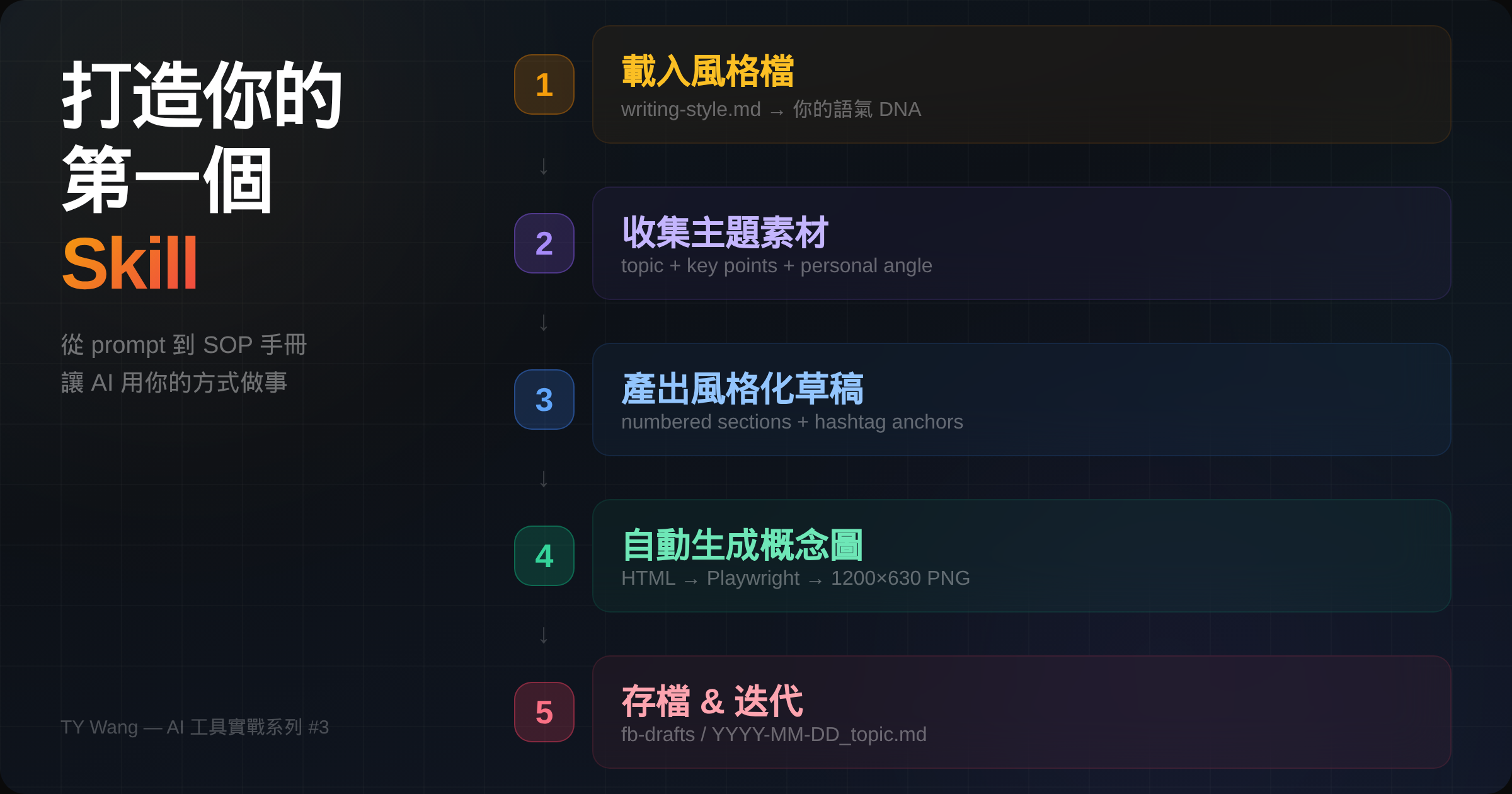
I built myself a "Facebook post Skill." The workflow looks roughly like this:
load my writing-style file -> collect topic and source material -> draft in my voice -> generate a matching image -> save everything into the target folder
In practice, I can throw in one sentence like "Write me a Facebook post about X," and the rest of the flow keeps going from there.
And because the style file came from my past writing, the output does not feel like generic AI copy. That detail matters a lot to me.
3. Style memory is the real key
The most important file in this Skill is writing-style.md.
It stores things like tone, structure preference, language habit, and even how I tend to close a post. None of that came from theory. It came from reviewing my own older posts and extracting the patterns.
If you do not tell the AI what your style is, it will use its own default. That is how many outputs end up technically correct but still strangely impersonal.
That was the biggest lesson for me here: useful automation often comes less from a more powerful model and more from better context.
4. The image is automated too
Another part I really like is the image generation.
Inside this Skill, I defined a small design system: colors, fonts, layout rules. Every time the post is generated, the system also creates a 1200x630 concept graphic.
I am not using AI image generation for that part. I am using HTML + CSS for the layout and Playwright to turn it into a PNG. The benefits are pretty direct:
- the style stays controllable
- the output stays consistent
- it avoids the weirdness that AI-generated images often have
5. If you want to build your first Skill
My advice is simple: start with the workflow you repeat most often.
You do not need a huge system on day one. Take one workflow that you do at least once a week and automate that first. My Facebook-post Skill started very small too. It only became useful because I kept using it and improving it.
So if you are wondering where to begin, I would not start with scale. I would start with something you know you will actually use.
Closing note
This is the third post in my AI tools in practice series. The first two were about Cowork and the big three tools. This one is the first more concrete look at how I turn tools into a personal workflow.
If there is interest, I would be happy to break this down further later and talk more step by step about building your own version.
PS
The post you are reading and the graphic above both came from the first draft generated by this Skill.
But the main judgment and tradeoffs are still mine. AI is not very good at replacing that part yet.